They Signed Up Again. Did Your Platform Just Delete Their Tags?
What should happen when a subscriber signs up twice: one record, add but never erase, unsubscribed readers confirm before returning. The form bug that wiped our subscribers' tags, and five tests for your own platform.
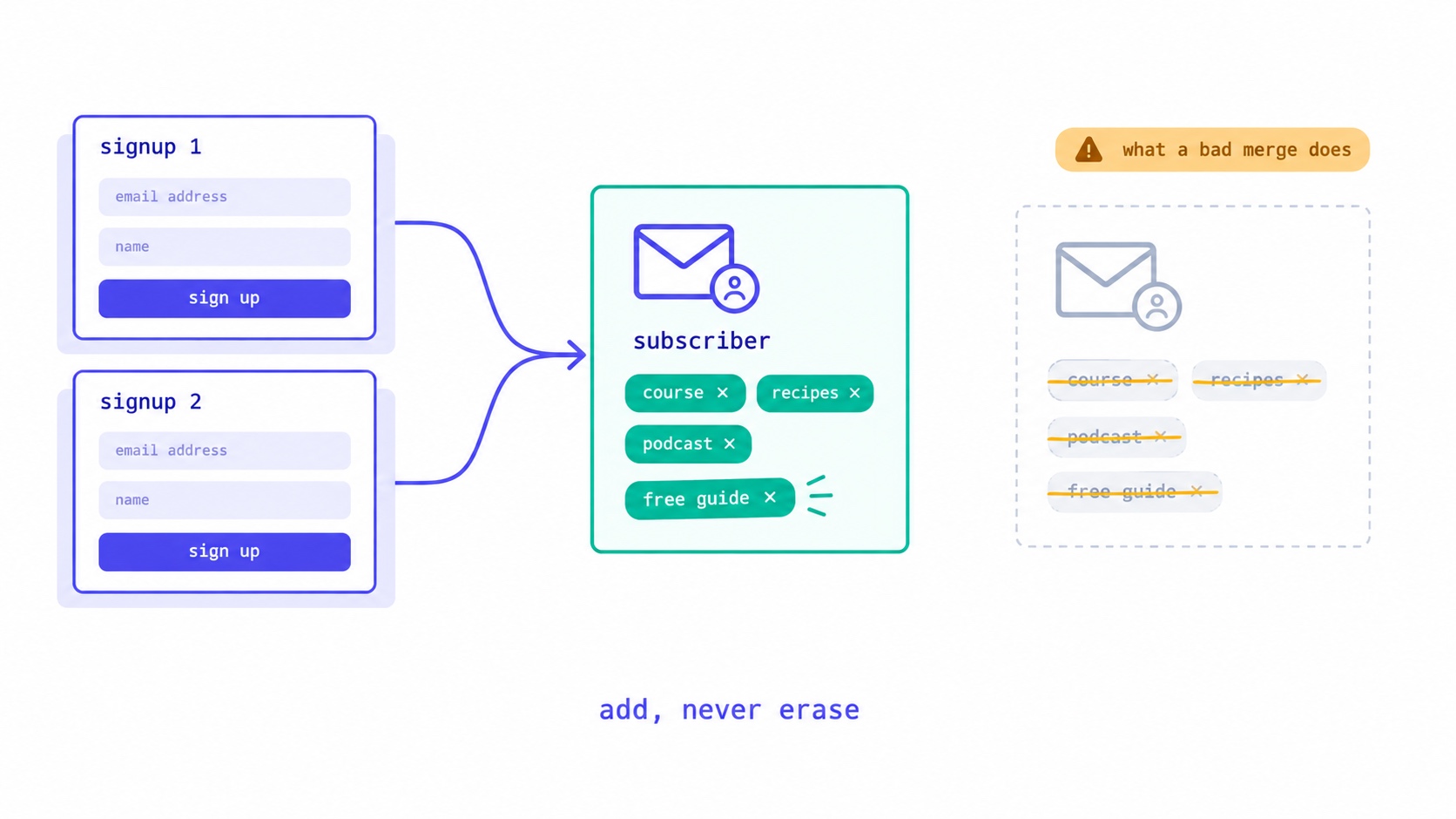
When a subscriber signs up twice, your email platform should recognise the address and keep a single record. The second signup can add what it brought, such as a new tag or a name you did not have, but must never erase anything it did not mention. If the person had unsubscribed, the second signup is a request to come back, and they should confirm it by email before receiving anything. Duplicate signups are ordinary: people forget they subscribed, grab a second freebie, or fill in a form on a different page. What decides whether they are harmless is how the platform merges the new signup into the old record. A careless merge can silently delete the tags that decide which emails a subscriber gets.
We found exactly that in our own platform, along with two related problems, and fixed all three. This guide explains what a duplicate signup should and should not change, field by field, and gives you five tests to run on whatever platform you use.
Why people sign up twice
A duplicate signup is almost never a mistake you need to prevent. It is a normal thing readers do:
- They forgot. Someone reads an article on your site, sees a signup form at the bottom and types their address in, not remembering they joined last year.
- They want a second freebie. You offer a new lead magnet, and an existing subscriber signs up to get it.
- They used a different form. A landing page, a pop-up, a link in your social bio and a form inside a partner's newsletter may all lead to the same list.
- Lists overlapped. You imported a list from an event, a course platform or a giveaway, and some of the people on it were already subscribers.
- They want to come back. Someone who unsubscribed months ago misses your newsletter and signs up again.
Each of these is a legitimate signal about the reader. The question is what your platform does with it.
Six things a second signup has to decide
When an address that is already on your list arrives through a form, an import or an integration, the platform has to answer six questions, usually in milliseconds and without asking you.
- Is it the same person? Is this address the same as one already on the list?
- What happens to their details? Name, tags, custom fields, signup source and history.
- What happens to their status? Active, unsubscribed, bounced or marked as spam.
- What happens to automations? Do they get the welcome sequence again? The lead magnet they just asked for?
- What happens to your counts? Your list size, your plan limits, your reports.
- What happens to your consent record? Can you still show when and how they agreed to hear from you?
The rest of this guide takes them in order.
Question 1: is it the same address?
Mostly yes, with two traps.
Capital letters and spaces. Jane@Example.com and jane@example.com with a trailing space are, for practical purposes, the same mailbox. A platform should trim spaces and compare addresses without regard to case. Strictly, the part before the @ can be case-sensitive under the email standard, but virtually no real mailbox works that way, and treating them as different creates duplicates.
Gmail's dots and plus signs. Gmail ignores dots in the part before the @, as its own help page, Dots don't matter in Gmail addresses, explains, so jane.smith@gmail.com and janesmith@gmail.com reach the same inbox. Gmail and several other providers also deliver jane+news@gmail.com to jane@gmail.com. Should a platform treat those as one subscriber?
Usually not automatically. Some people use plus addresses deliberately, to filter or to track who shares their address, and merging them overrides a choice they made. Most platforms keep them separate. But it is worth watching for the pattern from the other direction: a burst of signups using many dot or plus variations of the same address is a common sign of bot signups or list bombing. The post on bot signups covers how to spot it.
Question 2: what happens to their details
This is where most platforms make their choice silently, and where ours went wrong.
A form submission carries a little information: an email address, maybe a first name, maybe a tag that identifies the form. The existing subscriber record carries much more: every tag they have collected, their name, custom fields, when and where they joined, what they have opened and clicked. The platform has to merge the two.
There are three ways to do it.
The newest version wins. Whatever the new submission says replaces what the record says. Simple, and right when the new version is complete, such as a subscriber editing their whole profile. Wrong when the new version is partial, because every field it does not carry becomes an erasure.
The existing version wins. The new submission changes nothing. Safe against erasure, but it ignores real updates. If a reader corrects the spelling of their name, the correction is lost.
Field by field, with rules. Additions are added, blanks are ignored, and only deliberate changes overwrite. More work to define, and the only approach that respects both the reader's new input and what you already know about them.
What we found in our own platform
In late September we were fixing a different problem, described below, and decided to check every path that writes a subscriber record: forms, landing pages, imports, bulk edits in the dashboard and integrations. We asked each one the same question: when this touches a subscriber who already exists, what does it change?
The worst answer came from forms. Our merge treated a form submission as the new truth for the fields it carried, and forms do not carry tags. So when an existing subscriber filled in a signup form again, the merge replaced their tags with the form's, which was nothing. Every re-submission erased every tag. A reader tagged as a course buyer, or as interested in a particular topic, silently dropped out of every segment and sequence that depended on those tags.
Names had the same problem in a smaller way. A form with an optional name field, left blank, overwrote the subscriber's real name with a blank one. Every email after that greeted them with an empty merge tag.
Bulk edits in the dashboard had a version of it too. Changing one field on many subscribers at once could clear other fields that the request had not sent, so setting a category on fifty subscribers could blank their names.
Nothing errored in any of these cases. The subscriber stayed subscribed, the dashboard showed them as active, and the only symptom was an absence: a tag that was no longer there and an email that was no longer sent. Absences do not raise alerts.
All three now follow one rule: an update can add information, but it cannot remove information it did not mention. Tags from a form are added to the existing ones, keeping their order and skipping duplicates. A name is updated only if the submission includes a real one. A bulk edit changes only the field it was asked to change.
The merge rules, field by field
| Field | What a second signup should do | Why |
|---|---|---|
| Tags | Add any new tags; keep all existing ones | Tags drive segments and sequences |
| Name | Update only if a non-blank name was given | A blank field is not a request to delete |
| Custom fields | Update only fields the form actually carries | Other fields came from other sources |
| Original signup date and source | Keep; record the new signup as a separate event | Your consent record depends on it |
| Engagement history | Keep | Segments by activity need it |
| Status: active | Stay active | Nothing to change |
| Status: unsubscribed | Stay unsubscribed; send a confirmation email to return | Only the person can reverse an unsubscribe |
| Status: marked as spam | Stay suppressed | The clearest possible "no" |
| Status: hard bounced | Stay suppressed until the address is shown to work | Mailing dead addresses harms deliverability |
Question 3: what happens to their status
For active subscribers, nothing. For everyone else, this is the part with legal and deliverability consequences.
Someone who unsubscribed. A new signup looks like permission, but it is not proof. A bot may have filled in your form. Someone else may have typed the address, perhaps maliciously. And if you ever need to show the person chose to return, a form submission is weak evidence. The right response is to keep them unsubscribed and send a single email asking them to confirm. On our platform, a returning subscriber who had unsubscribed receives that email and is re-subscribed only when they press the confirmation button on the page it links to. Opening the link alone changes nothing, because email security systems open links automatically. The post on resubscribing after an unsubscribe covers the rules in detail.
Someone who marked your email as spam. That is the clearest signal a reader can send. Many platforms, including ours, do not send a confirmation email in that case. If the person truly wants to return, they can do it entirely on their own, and you should not reach out.
An address that hard-bounced. A bounce says the mailbox did not exist or refused mail. A new signup with that address is suspicious: either the person has created the mailbox again, or someone typed an address that does not work. Keep it suppressed. A double opt-in confirmation is the cleanest way to prove the address now works.
The import that reactivated unsubscribed readers
The problem that started our review was in imports. Re-importing a CSV file could set an existing subscriber's status back to active, even if that person had unsubscribed. A creator who exported their list, cleaned it in a spreadsheet and imported it again, or who imported an old list that overlapped with their current one, would have quietly put opted-out readers back into their sends.
We caught it in review rather than through harm: when we checked, no subscriber had been affected. It was fixed the next day, and re-importing now never changes an existing subscriber's status. Someone who opted out stays opted out, however many files their address appears in. If you are moving platforms, the post on switching newsletter platforms explains how to bring your suppression list with you so the new platform knows who opted out.
Question 4: what happens to automations
This depends entirely on how your automations are triggered, and it is worth knowing for each one.
Sequences that start when someone subscribes. An existing subscriber does not subscribe again, so they usually do not re-enter a welcome sequence. That is generally what you want: a reader of two years does not need "here is who I am". But check, because some platforms treat every form submission as a new subscribe event.
Lead magnet delivery. If the second signup was to get a new freebie, the subscriber expects it. A delivery email that only fires on a brand-new subscribe will never reach an existing subscriber, and they will feel ignored. Trigger lead magnet delivery on the form submission or on the form's tag, not on the subscribe event. Then test it with an address that is already on your list.
Sequences that start on a tag. If the form adds a tag that starts a sequence, the subscriber should enter that sequence, as long as they are not already in it. Check what your platform does when a tag is added to an existing subscriber through a form or an import, rather than by hand. The post on automations that do not send covers why triggers can behave differently from how they look in the editor.
Re-entry. Most platforms stop a subscriber entering the same sequence twice. If the sequence is meant to repeat, such as a reminder before each annual event, check the re-entry setting.
Question 5: what happens to your counts
A platform that creates a second record for a duplicate signup inflates your list. That has real costs. Most platforms charge by subscriber count, so you pay for the same person twice. Your reports overstate your audience, which sponsors will eventually notice. And the same person may receive every issue twice, which is the fastest way to turn a loyal reader into an unsubscribe or a spam complaint.
A well-behaved platform never creates a duplicate record for the same address. If you suspect yours does, export your list and check for repeated addresses after lowercasing and trimming them. Any you find should be merged before your next send. The list hygiene entry covers the other routine clean-ups worth doing.
Question 6: what happens to your consent record
Under GDPR, where you rely on consent, you must be able to show that each person gave it; Article 7(1) puts that burden on you, not on the subscriber. For most creators that means keeping, for every subscriber, when they signed up, through which form or source, and whether they confirmed.
A merge that overwrites the original signup date or source with the latest one damages that record. If someone later asks how you got their address, the honest answer is the first signup, not the most recent form they filled in. So keep the original and record each later signup as an additional event. The same applies to unsubscribes: keep the record that someone left, and how they came back, so you can show they returned by their own choice.
When the same person arrives through two tools
Many creators collect subscribers in more than one place: a course platform, a shop, a webinar tool, a community app. Each may push new contacts into your email platform through an integration. Every one of those integrations is another path that writes subscriber records, with its own idea of which fields it owns.
The risk is the same as with forms, multiplied. A course platform that sends a contact with an empty name field, or a shop integration that overwrites custom fields with its own blank values, can erase information that came from somewhere else. And if each tool applies its own tag, a subscriber who bought a course and joined a webinar should end up with both tags, not with whichever arrived last.
Before connecting a new tool, run test 1 below through it: tag a test subscriber, send the same address in through the new integration, and check what survived. If you rely on tags from several tools to start sequences, the automation sequences guide covers how to structure them so a late-arriving tag still does what you expect. If you offer several freebies, the post on lead magnet ideas covers how to tag each one so you can tell what brought a reader back, and the welcome sequence guide covers what new and returning readers should receive. If duplicates have been inflating your subscriber count, compare your cleaned count with the tiers on our pricing page before your next renewal.
Five tests to run on your own platform
You do not need access to anyone's code to find out how your platform handles duplicates. You need a test address of your own and about ten minutes.
- Re-submit a form. Give your test subscriber two tags and a name. Fill in your public signup form again with the same address and no name. Check that both tags and the name survived.
- Re-import. Put your test address in a CSV with only an email column and import it. Check the tags, the name and the status afterwards.
- Bulk-edit one field. Select a few subscribers including your test one, change one field in bulk, and check that nothing else changed.
- Unsubscribe, then re-submit. Unsubscribe your test address, then fill in your form again. A careful platform sends a confirmation email rather than silently re-subscribing.
- Sign up for a second freebie. With your test address already subscribed, sign up through a different lead magnet form and check that the freebie arrives.
None of these is exotic. Each describes something your readers or you will do in normal use. Most creators never test them because they assume someone else has. If your platform fails one, ask its support team what the intended behaviour is. If the answer is "that is how it works", you now know a rule to work around, which is better than discovering it through a segment that quietly emptied.
Designing your forms with duplicates in mind
A few habits make duplicate signups more useful and less risky, whatever platform you use.
Tag every form. Give each form its own tag, so a second signup through a different form tells you something: which content or freebie brought them back. That is useful information about what your readers want, and the segmentation guide covers how to use it.
Keep optional fields genuinely optional. If your platform overwrites with blanks, an optional name field is a liability. Remove it, or make sure your platform ignores blanks.
Show existing subscribers a friendly message. "You are already subscribed, and we have sent your guide to your inbox" is a better experience than a generic thank-you page, and it reassures the reader that nothing went wrong. Our landing page guide covers what to put on confirmation pages.
Use double opt-in for returning readers at least. Even if you use single opt-in for new subscribers, any route back for someone who unsubscribed, bounced or complained should require confirmation.
The short version
A duplicate signup is a reader telling you something, usually that they want more from you. Keep one record per address. Let the new signup add, never erase. Keep unsubscribed and bounced people suppressed until they confirm. Deliver what they asked for. And keep the original consent record intact.
InfluencersKit applies the add-never-erase rule to forms, landing pages, imports and bulk edits, and keeps unsubscribed readers out until they confirm. You can read how subscribers and segments are managed on the list management page, build forms and landing pages with the growth tools, and start a trial to run the five tests yourself. If you are building your list from scratch, the guide to growing from zero to 10,000 subscribers is a good next read.
Frequently asked questions
What happens when someone subscribes to my newsletter twice?
A well-behaved platform recognises the address and keeps a single subscriber record. It adds anything new from the second signup, such as a tag, without erasing existing information. If the person had unsubscribed, they stay unsubscribed until they confirm by email that they want to return.
Can a signup form delete subscriber tags?
It can, if the platform merges a form submission by replacing the subscriber's data with what the form sent. Forms usually send no tags, so the tags are replaced with nothing. Test it by tagging a test subscriber, re-submitting your form with the same address, and checking the tags afterwards.
Should an unsubscribed person who signs up again be added back automatically?
No. A form submission is not proof that the owner of the address wants to return; a bot or another person may have entered it. Send a confirmation email and re-subscribe them only when they confirm by pressing a button, not merely by opening the link.
Are jane.smith@gmail.com and janesmith@gmail.com the same subscriber?
They reach the same Gmail inbox, because Gmail ignores dots. Most platforms still treat them as separate addresses, since some people use variations deliberately. A burst of signups using many dot or plus variations of one address is a common sign of bot signups.
Will an existing subscriber get my welcome sequence again?
Usually not, because welcome sequences normally start when someone subscribes, and an existing subscriber does not subscribe again. Check how your platform handles form submissions by existing subscribers, and trigger lead magnet delivery on the form or its tag so returning readers still receive what they asked for.
Do duplicate subscribers cost me money?
They can. Most email platforms charge by the number of subscribers, so a platform that stores the same person twice charges you twice. Duplicates also overstate your audience to sponsors and may send the same person every issue twice. Export and check your list for repeated addresses after lowercasing them.
Should a re-import change subscribers' status?
No. Re-importing a list should never make an unsubscribed, bounced or complained address active again. Check what your platform's importer does with existing records before re-importing, and keep your suppression list separate so it travels with you when you move platforms.
Stay Updated
Get the latest insights, strategies, and tips delivered directly to your inbox. Join thousands of creators who are building their email communities with our weekly newsletter.
No spam, unsubscribe at any time. We respect your privacy.
Related Articles
A New Domain Has No Reputation. Here Is How to Build One.
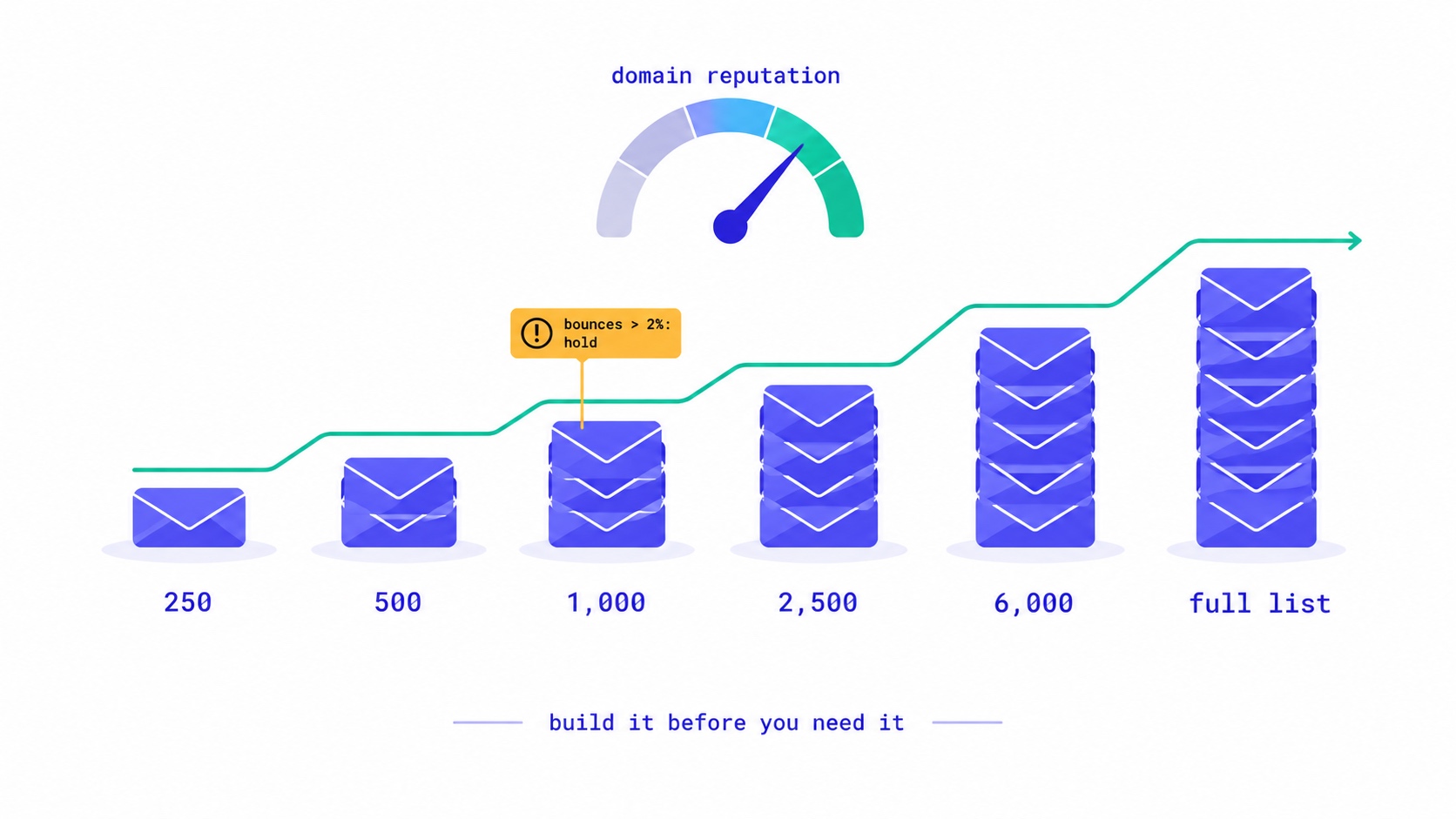
How to warm up a new email domain for a newsletter: authenticate first, send to recent clickers in small batches, and grow only while bounces stay under 2% and complaints under 0.1%. A 20,000-subscriber schedule, the numbers to watch, and what happened when an account skipped it.

They Unsubscribed, Then Signed Up Again. Now What?
Only the reader can reverse an unsubscribe. A fresh signup is a request, not proof. Why imports, forms and bulk edits quietly resubscribe people, and how to build a confirmation step that a link scanner or a stranger cannot trigger.

Newsletter Reactivation: How to Win Back Inactive Subscribers (With Templates)
Every newsletter has inactive subscribers silently dragging down deliverability. A well-designed reactivation campaign recovers 8–20% of them while identifying the truly unrecoverable. The four-part reactivation sequence, subject lines that break through inbox habituation, the list hygiene logic that improves metrics after removal, and the onboarding system that prevents inactivity from accumulating in the first place.
Something Clicked Every Link in Your Newsletter in 40 Milliseconds.
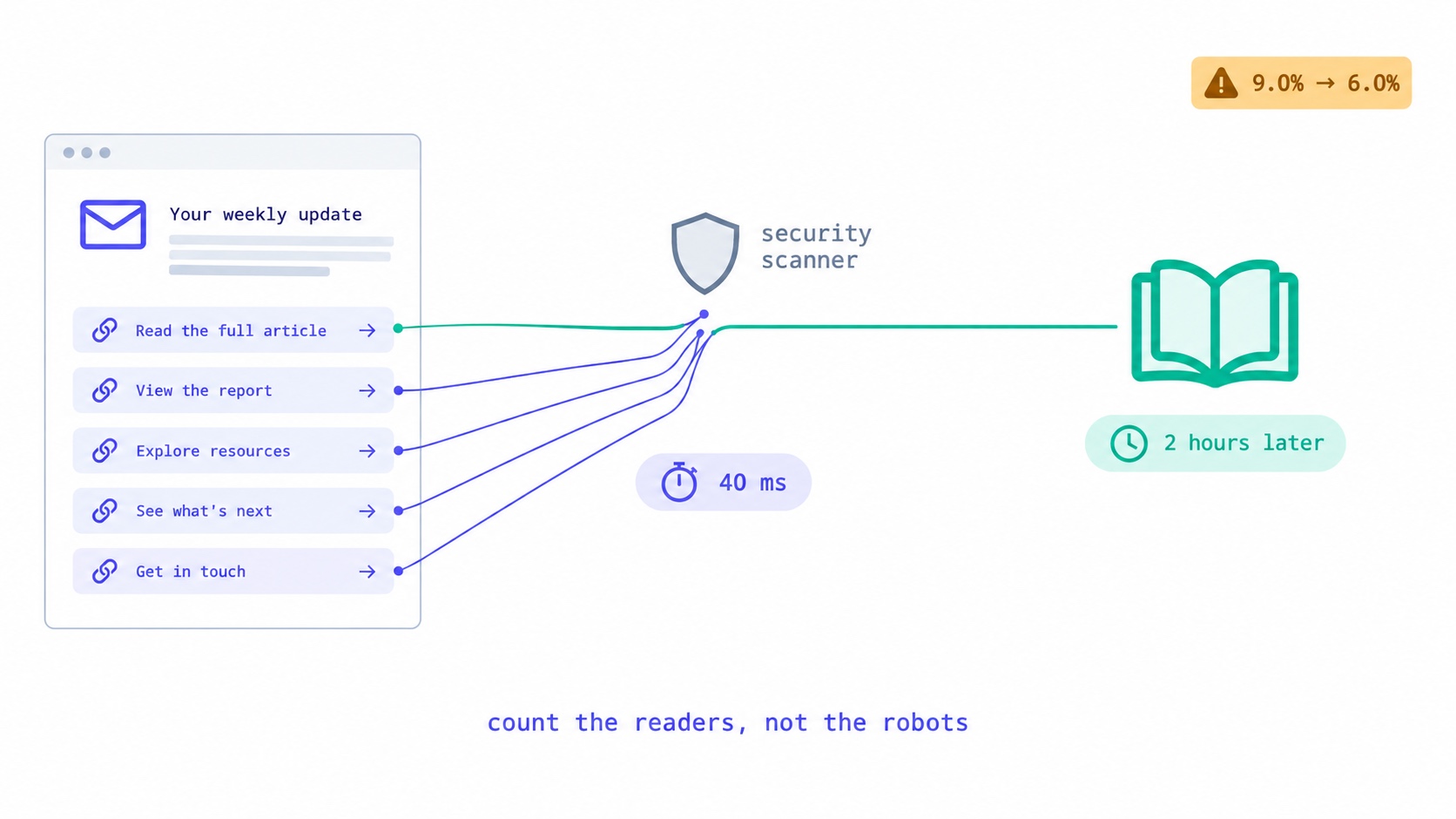
Corporate email security scanners click every link at delivery, inflating newsletter click rates. How to recognise them, the two counting bugs we fixed, the problem we have not solved, and what to tell sponsors.
Your Automation Says Active. Nobody Has Received It.
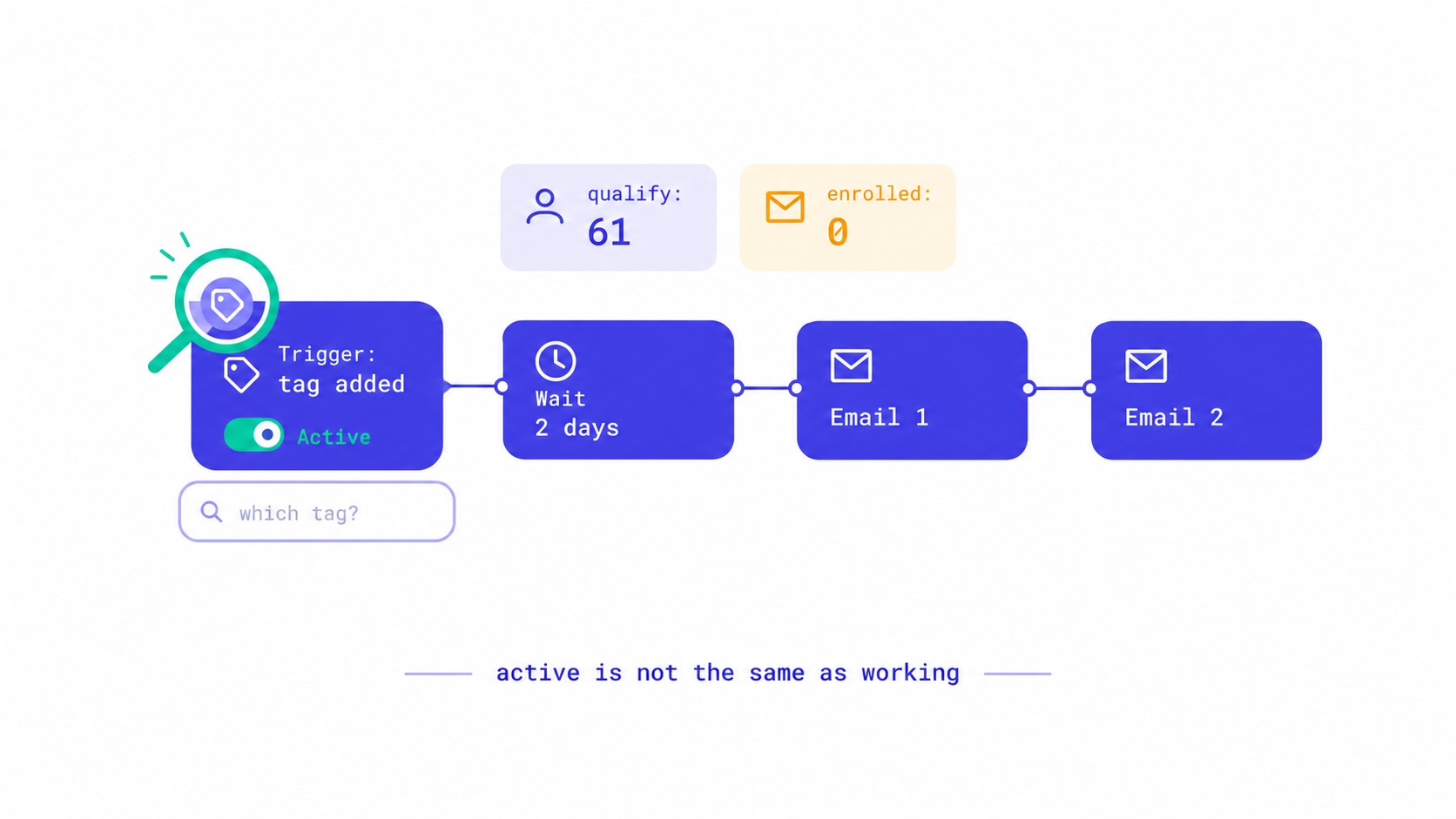
Seven reasons an email automation is switched on but sends nothing, from triggers that ignore existing subscribers to tag triggers with no tag. The qualify-versus-enrolled check that found 28 of our own sequences silent, and a fifteen-minute monthly audit.
Your Readers Can Leave Without Ever Seeing Your Page.
Since 2024, Gmail and Yahoo require one-click unsubscribe. A mail-app button removes the reader instantly, with no page, no options and no reason. Your preference centre now reaches only footer-link leavers, so the 'less, not none' options belong inside the email.

Your List Grew 1,500 Overnight. None of Them Are Real.
A signup spike with no launch behind it is usually list bombing. Fifteen hundred fake signups can push a welcome stream to six times Gmail's complaint limit and overstate your list by 30% to sponsors. How to spot them, why Apple Mail hides some, and how to clean up without making it worse.

Moving Your Newsletter? The List Is the Easy Part.
The CSV moves in five minutes. Sender reputation, unsubscribes, paid subscriptions, automations and old signup forms do not. The order that gets a newsletter to a new platform without losing inbox placement or emailing people who opted out.
Apple Broke Your Open Rate. And Your Subject Line Tests.
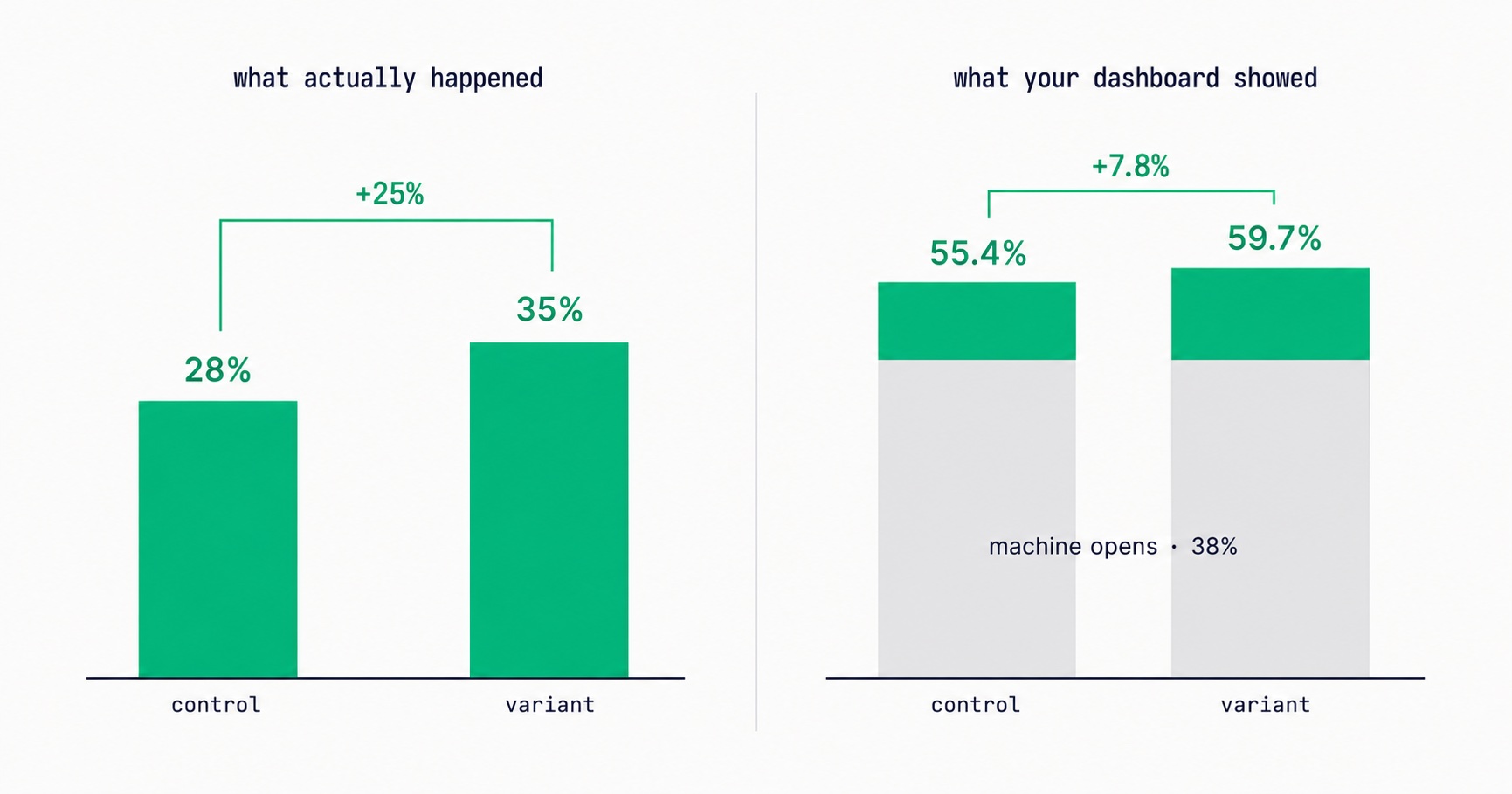
Every article about Apple Mail Privacy Protection says open rates are unreliable. None of them explain the part that actually changes your decisions: MPP doesn't add random noise, it systematically compresses the measured gap between two subject lines by roughly 3x — which is why so many creators ran good tests, saw flat results, and concluded subject lines don't matter.

Newsletter Viral Loops: How to Make Your Subscribers Your Growth Engine
Most newsletter growth requires proportional effort. A viral loop changes this: each new subscriber creates a mechanism that brings in additional subscribers. The viral coefficient math, four loop architectures (referral, forward, access gate, social proof), stacking strategy, re-promotion system, and the content quality foundation that makes viral growth compound rather than spike.
Newsletter Cross-Promotion: How to Add 300-700 Subscribers Per Month at Zero Cost
A well-executed newsletter swap can generate 200–500 new subscribers in 48 hours at zero acquisition cost. The complete system: the 4-factor partner qualification criteria, five cross-promotion formats ranked by conversion rate, outreach pitch templates that get replies, and a monthly programme that produces subscriber growth reliably.

Email Marketing for Online Coaches: Build Your List, Nurture Prospects, Fill Your Program
Coaching has a long sales cycle — clients need weeks of trust-building before they commit. Email is the only marketing channel that matches this cycle structurally. The complete system: how to build a list that attracts your ideal client profile, the 7-email welcome sequence that pre-qualifies prospects, and how to run enrollment conversations through email without feeling salesy.