Your Members Didn't Cancel. Their Cards Did.
Failed renewals are the cheapest churn to fix. Four layers to recover them: prevent, retry, ask and decide, with Stripe settings, a dunning sequence to copy and the rules for Indian cards.
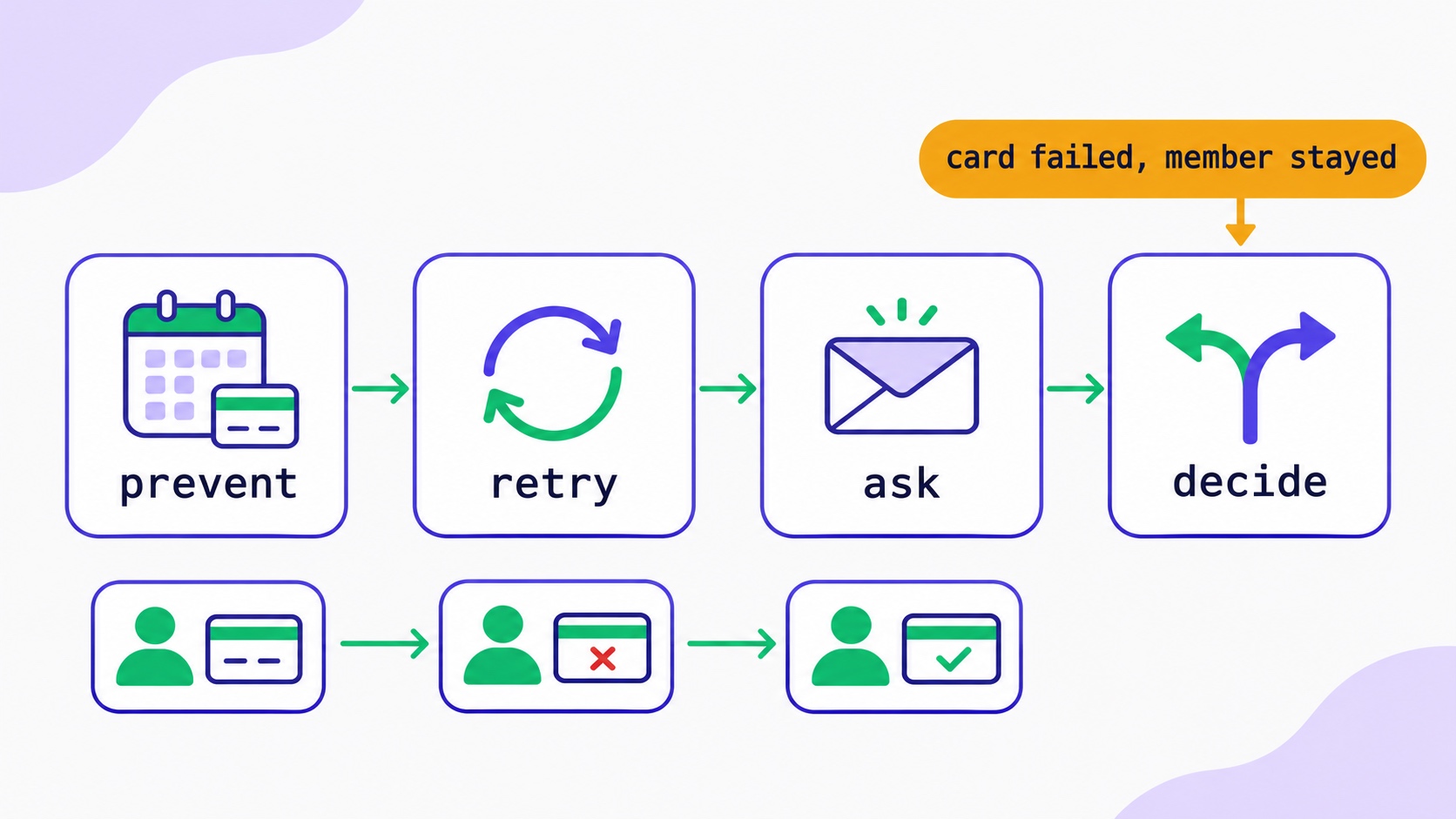
When a paid subscriber’s renewal fails, they have not cancelled. Their card has. Most of these members want to stay, and you can keep many of them with four layers that cost nothing to set up: stop failures before they happen (expiring-card emails and automatic card updates), retry the charge at sensible times (Stripe’s Smart Retries, which by default makes up to eight attempts over two weeks), ask the member to fix it with a short sequence of emails that link straight to an update-card page, and decide in advance what happens if nothing works. Readers with Indian cards need a different plan, because Stripe does not retry those payments at all and every renewal needs a mandate. This loss is called involuntary churn, and for a paid newsletter or membership it is usually the cheapest churn to fix.
This guide walks through each layer with the settings to change, the emails to send, and the numbers to watch. It is written for creators who take payments through their own Stripe account, which is how paid newsletters, memberships and courses work on InfluencersKit and many other platforms.
Two kinds of churn, and why the second one is different
Voluntary churn is a member deciding to leave. They clicked cancel, or asked you to stop. The fix is your content, your price or your fit with their needs, and it is slow work.
Involuntary churn is a member who meant to stay and lost access anyway. Their card expired, the bank blocked the charge, there was not enough money in the account that day, or the payment needed an approval they never saw. Nothing about your newsletter changed. The fix is plumbing, and most of it is a few settings and three or four emails.
Stripe records which is which. When a subscription ends, its cancellation_details.reason field says cancellation_requested for a deliberate cancellation and payment_failed when retries ran out. If you have never split your cancellations this way, do it before anything else. It is common to discover that a meaningful share of “cancellations” were members whose payments simply failed.
The post on your newsletter’s growth ceiling shows why this matters so much. Every point of monthly churn lowers the size your list can ever reach. Involuntary churn lowers it just as much as voluntary churn, and it is far easier to reduce.
Why renewal payments fail
A declined renewal comes back with a reason from the card issuer. Stripe groups these into two kinds, and the difference decides what you should do next.
Type          Examples                         What happens next
────────────  ───────────────────────────────  ──────────────────────────────
Soft decline  insufficient_funds, do_not_honor, A retry on another day can work.
              generic_decline                   Stripe retries automatically.

Hard decline  expired card (needs new details), Retrying the same card will not
              lost_card, stolen_card,           work. The member must add a new
              incorrect_number,                 payment method.
              revocation_of_authorization,
              authentication_required,
              transaction_not_allowed
Stripe’s retry documentation lists the hard declines it will not retry. For those, retries stay scheduled but only run once the member adds a new card. So the member has to be told, which is why the emails in the third layer matter more than any retry setting.
authentication_required deserves a note of its own. In Europe, the UK and India, banks can require the cardholder to approve some payments with a one-time code or an app prompt. A renewal that needs approval cannot be completed while the member is asleep. Stripe can email them a link to approve it, which is one of the settings below.
Layer 1: stop failures before they happen
The cheapest failed payment is the one that never happens. Three settings in Stripe help, and none of them needs code.
- Expiring-card emails. Stripe can email a member a month before the card on file expires, with a link to update it. Turn on Send emails about expiring cards in your Stripe revenue recovery settings.
- Automatic card updates. When a bank issues a replacement card, Stripe works with the card networks to update the saved details automatically. It only works where the issuer takes part, so it will not catch every case, but it quietly fixes many expiries you would otherwise never hear about. There is nothing to switch on, but it is worth knowing why some expired cards renew without trouble.
- Renewal reminders for annual plans. An annual renewal is a large, unexpected charge, which is exactly what a bank’s fraud check is suspicious of. A reminder a week or two before gives the member time to check their card and makes a surprise dispute less likely. Turn on Send emails about upcoming renewals.
One more preventive habit: offer an annual plan. A member on an annual plan has one renewal a year that can fail instead of twelve. The post on membership tiers and pricing covers how to price it.
A few checkout choices also make renewals less likely to be blocked in the first place:
- Use a statement descriptor people recognise. The short text on a member’s bank statement should be your newsletter’s name, not your legal company name or a cryptic abbreviation. A charge the member does not recognise is more likely to be reported as fraud, which blocks the card for every merchant, not only you. Set it in your Stripe public business details.
- Price in your audience’s currency where it is concentrated. Banks scrutinise foreign-currency and cross-border charges more closely. If most of your paying readers are in one country, charging in that country’s currency removes one reason for a decline.
- Offer wallets. Apple Pay and Google Pay are quick for the member, and they are often linked to a card the member already keeps up to date for everyday spending.
Layer 2: retry at the right times
When a renewal fails with a soft decline, the same card often works a few days later: after payday, after the member calls their bank, or after a temporary block lifts. Stripe’s Smart Retries uses machine learning to pick retry times. For new Stripe accounts it is on by default and set to up to eight retries within two weeks. You can choose a window of one, two or three weeks, one month or two months, or switch to a custom schedule of up to three retries on days you pick.
My suggestion for a monthly newsletter or membership is to keep Smart Retries on and stretch the window to three weeks. Two weeks is short when a member is travelling or waiting for a replacement card, and a month risks overlapping with the next renewal. For annual plans, a month is reasonable, because one recovered renewal is worth twelve monthly ones.
Retries are configured in the Stripe Dashboard under Billing → Revenue recovery → Retries. If you build anything on top, the invoice.payment_failed webhook fires on each failure and carries an attempt_count, so you can see how far through the schedule a member is.
Layer 3: ask the member, clearly and kindly
Retries recover soft declines. Everything else needs the member to act, and they will only act if they know. This sequence of emails is usually called dunning, which is an old word for chasing a debt and the wrong tone entirely. Think of it as helping a reader who wants to keep reading.
The simplest start is Stripe’s own: turn on Send emails when card payments fail. Stripe then emails the member after each failed payment with a link to a secure page where they can update their card, and the outstanding invoice is paid from the new card. It uses your Stripe branding, so set your logo and colours first. The customer emails documentation lists the options.
If you prefer to write your own, keep it to four emails and send them from your usual newsletter address, in your own voice. Here is a sequence you can adapt:
Day 0  Subject: Your payment didn't go through
       Hi Priya, your renewal for [Newsletter] didn't go through. It's
       usually an expired card or a bank check, nothing you did wrong.
       You can update your card here (takes a minute): [link]
       Your access carries on while we sort it out.

Day 3  Subject: Quick reminder about your [Newsletter] payment
       We tried again and the card still isn't working. If you've had
       a new card recently, that's almost certainly why. [link]

Day 7  Subject: Still want [Newsletter]?
       Here's what you've had this month: [two recent issues, linked].
       If you'd like to keep going, update your card here: [link].
       If you meant to stop, no need to do anything.

Day 14 Subject: Last note about your subscription
       We'll stop trying your card on [date], and your paid access
       will end then. Update your card any time before: [link].
       Thanks for reading. - [Your name]
A few rules make these work better:
- Link straight to the update page. Never ask a member to log in and find billing settings. Every extra step loses people.
- Say access continues. A member who thinks they have already lost access has less reason to fix it.
- Blame the card, not the reader. “Your payment failed” reads as an accusation. “Your card didn’t go through” does not.
- Show what they get. The third email is the one that recovers the members who had half forgotten why they paid. Two strong recent issues do more than any discount.
- Do not send these from a no-reply address. Some members will reply to ask what happened. That reply is a member you are about to keep.
The emails also count as part of your automation setup, and the same deliverability rules apply. A payment email that lands in spam recovers nobody.
Layer 4: decide what happens when nothing works
When the last retry fails, Stripe moves the subscription to whatever state you chose in your settings. The four options are:
Setting               Subscription becomes  What it means
────────────────────  ────────────────────  ──────────────────────────────────
Cancel                canceled              Ends. The member must subscribe
                                            again to come back.
Mark as unpaid        unpaid                Kept, but invoices are created and
                                            closed without charging.
Leave overdue         past_due              Kept, and Stripe keeps creating and
                                            charging invoices on your settings.
Pause (if eligible)   paused                No new invoices until it resumes.
For most paid newsletters, cancel is the clearest choice. It ends access cleanly, matches the date you gave in the final email, and keeps your member count honest. A former member who comes back simply subscribes again. The post on readers who come back after leaving covers the consent side of that return.
Whatever you choose, decide when access actually ends. A grace period, where the member keeps reading while retries run, is kinder and recovers more people than cutting access on the first failure. It also costs you almost nothing: an issue sent to a member whose payment is being retried is not a lost sale.
One more case to know about. If a member files a dispute with their bank about a subscription payment, Stripe can cancel the subscription automatically, depending on your billing settings, and records the reason as payment_disputed. The post on chargebacks and refunds explains how disputes work and how to avoid them.
Members paying with Indian cards
If you have readers in India, or you are an Indian creator selling to a home audience, renewals work differently, and the default retry advice does not apply.
Under Reserve Bank of India rules, recurring charges on Indian cards need an e-mandate: a one-time registration the member approves with additional authentication, such as a 3D Secure code. Stripe’s India recurring payments guide sets out what follows:
- The member must be notified at least 24 hours before each charge, and can skip it or cancel the mandate from that notice. Stripe waits 26 hours before charging an Indian card to allow for it.
- Renewals above ₹15,000, or above the mandate’s maximum, need the member to authenticate each time.
- Stripe does not automatically retry failed payments on India-issued cards.
- A cancelled or expired mandate means the next renewal is declined. The member has to come back and set up a new one.
So for Indian members, the third layer is everything. Turn on Stripe’s failed-payment emails, and consider sending your own message on the day a renewal fails, because there will be no second attempt to catch it. Keep monthly prices well under ₹15,000 if you can, so most renewals need no extra approval. And expect some members to miss or decline the bank’s pre-debit notice, which is a renewal you will only recover by asking.
Win back the members you already lost
Everything above protects future renewals. You probably also have a group of former members who left because a payment failed, not because they wanted to. They are the warmest people you will ever ask to subscribe, and most creators never ask them.
Pull the list from Stripe: subscriptions cancelled in the last six to twelve months with the reason payment_failed. Most of these people are probably still on your free list, opening your free issues. Send them one short, personal email that says, honestly, that their paid subscription ended because a card stopped working, not because of anything they did, and offers a link to rejoin. A modest return offer, such as the first month at the old price if you have since raised it, is fair; a deep discount is not needed and teaches people to wait for one.
Do not mix this group with people who cancelled on purpose. A member who chose to leave and gets an email implying their card failed will find it odd at best. The post on win-back campaigns has templates for the deliberate leavers, and the segmentation guide covers how to keep the two groups apart.
The numbers to watch
Two numbers tell you whether this is working, and both come straight from Stripe:
Failed payment rate = renewals that failed at least once
                      / renewals attempted                 (per month)

Recovery rate       = failed renewals later paid
                      / renewals that failed at least once (per month)

Involuntary churn   = subscriptions ended with reason payment_failed
                      / members at the start of the month
A worked example with round, invented numbers: a newsletter with 400 paid members at $8 a month sees 32 renewals fail in a month. If retries and emails recover 20 of them, it loses 12 members to failed payments instead of 32. That is 20 members kept, or $160 a month, and $1,920 over a year if they stay. For a small paid newsletter, that can be more than a month of new paid sign-ups. If you want to see what your own list is worth per subscriber, the email list revenue calculator gives a quick estimate, and the glossary entries on paid subscription MRR and subscriber lifetime value define the terms.
Check these monthly, alongside your free-to-paid conversion and the rest of your newsletter metrics. If the recovery rate is low, look at the decline reasons. Lots of hard declines means members are not reading or acting on your emails. Lots of soft declines that never recover may mean your retry window is too short.
How this works on InfluencersKit
I want to be exact here, because “we handle failed payments” means very different things on different platforms.
On InfluencersKit, memberships are paid through your own Stripe account, and we take a 0% platform fee on those sales. That means the retry schedule, the failed-payment emails and the end-of-retries setting all live in your Stripe Dashboard, where you have full control of them. InfluencersKit records what Stripe tells it through the webhook:
- each paid renewal (
invoice.paid) appears as its own transaction, - a failed payment (
payment_intent.payment_failed) is added as a failed transaction, - and when Stripe ends the subscription (
customer.subscription.deleted), the member changes to cancelled on your Students tab.
Two consequences are worth knowing. First, InfluencersKit sends your members no payment emails of its own, so if you do not turn on Stripe’s failed-payment emails or send your own, nobody tells the member. Second, while Stripe is still retrying, the member stays paid on your Students tab. Their status only changes when Stripe gives up and cancels. The courses and memberships help article lists exactly what is and is not enforced, and fees, payouts and refunds covers the money side.
We chose to keep payments in the creator’s own Stripe account so that the money, the customer relationship and these settings belong to you, and so that leaving us never means losing your paying members. The trade-off is that recovery is set up in Stripe rather than switched on for you. This guide is the setup.
Test it before a real member finds the gaps
Most creators set this up once and never see it run until a real member’s card fails. By then a broken link or a confusing email has already cost a renewal. Test it in a Stripe sandbox first, which takes about ten minutes:
- Create a test subscription with Stripe’s test card
4000 0000 0000 0341. It attaches to a customer successfully, but every charge on it fails, which is exactly a renewal that will not go through. - Use a sandbox customer email that belongs to a confirmed member of your Stripe team, since Stripe only sends sandbox emails to those addresses.
- Advance the subscription to its renewal with a test clock, and check that the failed-payment email arrives, looks like yours, and links to a page where the card can be changed.
- Replace the card with a working test card on that page and confirm the open invoice is paid.
- Let another test subscription run out of retries and confirm it ends in the state you chose, and that your platform shows the member as cancelled.
Also read the emails on a phone. Most members will open them there, and a link that is easy to tap matters more than any wording.
A 20-minute setup checklist
- In Stripe, open Billing → Revenue recovery → Retries. Keep Smart Retries on and set the window to three weeks for monthly plans.
- Under revenue recovery emails, turn on emails when card payments fail and emails about expiring cards.
- Turn on emails for payments that need confirmation, so members can approve authentication requests.
- For annual plans, turn on upcoming renewal reminders.
- Set your Stripe branding, so those emails look like they come from you.
- Choose what happens after the final retry. Cancel is the clearest for most newsletters.
- If you write your own sequence, schedule it for days 0, 3, 7 and 14, from an address members can reply to.
- Add a monthly check of failed payment rate and recovery rate to your routine.
If you are still deciding how to monetise, the paid newsletter launch guide covers the setup before any of this matters, and the newsletter valuation post shows why retention, including payment retention, is what a buyer pays for. The Monetize page describes how InfluencersKit handles memberships and products, pricing lists the plans, and you can start free.
Frequently asked questions
What is involuntary churn?
Involuntary churn is losing a paying subscriber who did not choose to leave, usually because their renewal payment failed. Common causes are expired or replaced cards, insufficient funds, bank fraud checks and payments that needed approval. It is fixed with retries, card update emails and clear end-of-retry rules rather than with content changes.
How many times does Stripe retry a failed subscription payment?
With Smart Retries, new Stripe accounts default to up to eight retries within two weeks, and you can set the window from one week to two months. A custom schedule allows up to three retries on days you choose. Stripe does not retry hard declines, such as a lost card, until a new payment method is added, and does not retry India-issued cards.
What should a failed payment email say?
Say the payment did not go through, that it is usually an expired card or a bank check, and give one link straight to a page where they can update their card. Tell them access continues for now. Send three or four messages over about two weeks, ending with the date access will stop.
Should I cut off access as soon as a payment fails?
Usually not. Most failures are fixable, and a member who still has access is more likely to update their card. Keep access while retries run, then end it on the date your final email gave.
Why do renewals on Indian cards fail more often?
Recurring charges on Indian cards need an e-mandate the member approved, a notice at least 24 hours before each charge, and extra authentication above ₹15,000. A member who misses or declines the notice, or whose mandate has lapsed, will see the renewal declined, and Stripe does not retry India-issued cards automatically.
How do I know if a cancellation was a failed payment?
In Stripe, a cancelled subscription’s cancellation reason says payment_failed when retries ran out, and cancellation_requested when it was cancelled deliberately. Split your monthly cancellations by that field to see how much of your churn is involuntary.
Stay Updated
Get the latest insights, strategies, and tips delivered directly to your inbox. Join thousands of creators who are building their email communities with our weekly newsletter.
No spam, unsubscribe at any time. We respect your privacy.
Related Articles
How to Create a Paid Membership Newsletter: Tiers, Pricing, and Content Strategy
Paid newsletters generate revenue that compounds with every subscriber and is immune to algorithm changes. The complete framework: pricing that reflects actual content value, the free-to-paid content split that converts without giving everything away, founding member launch mechanics, retention systems that reduce churn, and the platform fee math that decides how much you actually keep.
How to Launch a Paid Newsletter: Complete Step-by-Step Guide for 2026
The paid newsletter market is $2B+ and growing. But most creators launch wrong — wrong pricing, wrong timing, wrong content split. This is the definitive playbook: when you're actually ready, how to price it, the 14-day pre-launch sequence, and why 0% platform fees matter enormously at scale.
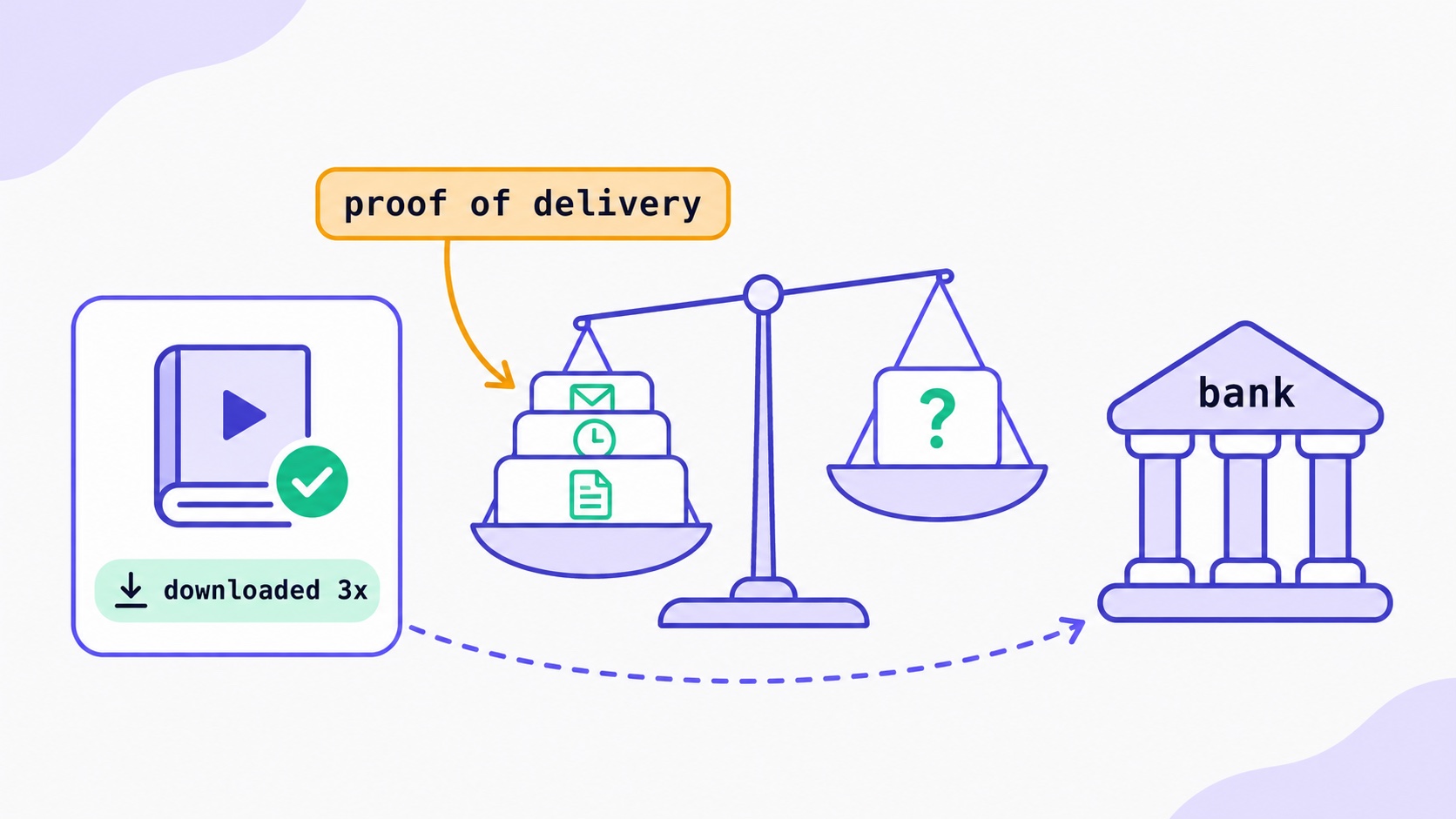
Someone Downloaded Your Course, Then Called Their Bank.
What a chargeback on a digital product really costs, the seven changes that prevent most disputes, a refund policy you can copy, the evidence that wins for downloads, and when to accept.

Two Newsletters Earn $10k a Month. One Is Worth $100k More.
Same monthly income, very different sale price. Published multiples put paid subscription revenue around 24-42x MRR and sponsorship-supported newsletters closer to 20-32x, which means shifting your revenue mix beats a hard 30% growth year. The four discounts buyers apply, and why they are all decided 12-18 months before anyone makes an offer.
Your Free-to-Paid Rate Is Two Numbers Pretending to Be One
Long-tenured subscribers convert three to five times better than new ones, and later cohorts are acquired more broadly than early ones. Both effects correlate with join date, so they cancel inside your blended conversion rate — and the two situations they describe call for completely opposite responses. The same-tenure comparison that separates them.

Newsletter Upsell Strategies: How to Sell Digital Products to Your Email Subscribers
Email converts digital product sales at 40x the rate of social media — yet most newsletter creators undermonetize because they upsell incorrectly. The complete architecture: the 7-email post-subscribe sequence that warms subscribers before the pitch, the four mid-issue CTA formats ranked by conversion rate, dedicated launch issue structure, product-type positioning for courses/templates/ebooks/coaching, segmentation-based upselling, and the non-buyer re-engagement approach that reaches subscribers on their own timeline.
Affiliate Marketing for Newsletter Creators: Building a Recurring Commission Base in 2026
The gap between $200/month and $4,000/month in affiliate income usually isn't audience size — it's programme selection (recurring vs. one-time commissions), recommendation quality, and placement architecture. The complete system: which programmes compound, how to integrate recommendations without damaging editorial trust, and the month-by-month build to a passive recurring base.

How to Price Newsletter Sponsorships: The Complete Rate Card Guide for 2026
Most newsletter creators undercharge because they don't understand how newsletter advertising is actually priced. CPM benchmarks by niche, the variables that justify rates above the benchmark, how to price small-list sponsorships without CPM, placement tiers, package structures, and how to build a media kit that gets the conversation to yes.

Creator Email Marketing: Complete Strategy Guide from 0 to $10K/Month
Step-by-step roadmap to build a profitable newsletter from zero subscribers to $10,000 monthly revenue. Tactical strategies, growth timelines, and monetization milestones for content creators.
The Kindest Thing You Can Do for Your List Is Make It Smaller.
When to remove inactive subscribers, as a six-step worksheet: define engagement beyond opens, pick a window, ask the quiet group, then suppress rather than delete. With re-engagement emails you can copy.
Your Newsletter Account Was Hacked. Do These Things in This Order.
An attacker with your newsletter account holds your list and your sender reputation. What to do in the first 15 minutes, what to check in the first hour, how to tell readers, and when you must report it.
They Signed Up Again. Did Your Platform Just Delete Their Tags?
What should happen when a subscriber signs up twice: one record, add but never erase, unsubscribed readers confirm before returning. The form bug that wiped our subscribers' tags, and five tests for your own platform.